Linear Structures
Introduction
Stacks
Queues
Deques
3.1~3.2 What Are Linear Structures?
They are data collections whose items are ordered depending on how they are added or removed. Once an item is added, it stays in that position relative to the other elements that came before and came after it. Collections such as these are often referred to as linear ADT.
Linear ADT can be thought of as having two ends. Sometimes these ends are referred to as the left and the right, or in some cases the front and the rear.
What distinguishes one linear structure from another is the way in which items are added and removed, in particular the location where these additions and removals occur.
3.3 What is a Stack?
A stack (sometimes called a push-down stack) is an ordered collection of items where the addition of new items and the removal of existing items always takes place at the same end. This end is commonly referred to as the top. The end opposite the top is known as the base.
The base of the stack is significant since items stored in the stack that are closer to the base represent those that have been in the stack the longest. The most recently added item is the one that is in position to be removed first. This ordering principle is sometimes called LIFO, or last in, first out.
Almost any cafeteria has a stack of trays or plates where you take the one at the top, uncovering a new tray or plate for the next customer in line. Imagine a stack of books on a desk. The only book whose cover is visible is the one on top. To access others in the stack, we need to remove the ones that are sitting on top of them.
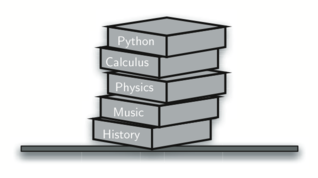
Assume you start out with a clean desktop. Now place books one at a time on top of each other. You are constructing a stack. Consider what happens when you begin removing books. The order that they are removed is exactly the reverse of the order that they were placed.
Stacks are fundamentally important, as they can be used to reverse the order of items. The order of insertion is the reverse of the order of removal:
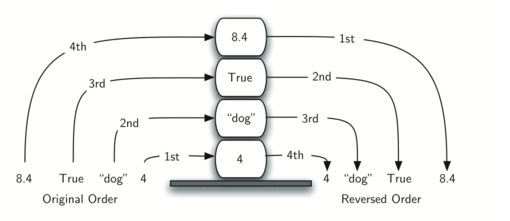
For example, every web browser has a Back button. As you navigate from web page to web page, those pages are placed on a stack (actually it is the URLs that are going on the stack). The current page that you are viewing is on the top and the first page you looked at is at the base. If you click on the Back button, you begin to move in reverse order through the pages!
3.4 The Stack Abstract Data Type
The stack operations are given below:
Stack()creates a new stack that is empty. It needs no parameters and returns an empty stack.
push(item)adds at the top and returnsvoid.top()reads the top without removing it.pop()removes the top and returnsvoid; calltop()first when the value is needed.
empty()tests whether the stack is empty.size()returns the number of elements.
Calling top() or pop() on an empty std::stack violates its precondition.
For std::stack, only the top is observable; the conceptual table lists the top item at the far right.
std::stack<int> operation |
Conceptual contents (top at right) | Return value |
|---|---|---|
s.empty() |
[] |
true |
s.push(4) |
[4] |
void |
s.push(7) |
[4, 7] |
void |
s.top() |
[4, 7] |
7 |
s.pop() |
[4] |
void |
s.size() |
[4] |
1 |
3.5 Using a Stack in C++
The cppds C++ text uses the Standard Library container adapter
std::stack<T>. Its public operations are push, pop, top, empty, and
size. Unlike the course's teaching class, STL pop() removes an item but
returns void; read top() before popping when the value is needed.
std::stack is a container adapter: by default it stores elements in a
std::deque, while exposing only LIFO operations.
The following is the C++ interface for cppds.
template <typename T>
class Stack {
    private:
        vector<T> items;
    public:
        bool isEmpty() { return items.empty(); }
        void push(T item) { items.push_back(item); }
        T pop() { T top = items.back(); items.pop_back(); return top; }
        T peek() { return items.back(); }
        int size() { return items.size(); }
        void display() { for (T x : items) cout << x << " "; cout << endl; }
};
Two distinct stack APIs are used in this course:
| API | Construction | Inspect top | Remove top |
|---|---|---|---|
STL std::stack<T> |
std::stack<T> s; |
top() |
pop() returns void |
Course header stack.hpp Stack<T> |
Stack<T> s; |
peek() |
pop() returns T |
The course Stack<T> is simpler and more intuitive than std::stack: pop() removes and returns the top item (with the STL you call top() first, then pop()), and its names push, pop, peek, isEmpty, size match the Stack ADT of this chapter. The homework uses the same course Stack<T> (pythonds3/cppds/stack.hpp). Do not mix method names between the STL and course interfaces.
First use the canonical STL adapter. The following cell is self-contained and shows its value-before-pop pattern.
#include <iostream>
#include <stack>
#include <string>
using namespace std;

int main() {
    stack<string> s;
    s.push("4"); s.push("dog"); s.push("true");
    cout << s.size() << endl;
    cout << boolalpha << s.empty() << endl;
    cout << s.top() << endl;
    s.pop();
    cout << s.top() << endl;
}
3
false
true
dog
We could instead keep the top at the beginning of the vector:
template <typename T>
class Stack2 {
    private:
        vector<T> items;

    public:
        bool isEmpty() {
            return items.empty();
        }
        void push(T item) {
            items.insert(items.begin(), item);   // O(n)!
        }
        T pop() {
            T top = items.front();
            items.erase(items.begin());   // O(n)!
            return top;
        }
        T peek() {
            return items.front();
        }
        int size() {
            return items.size();
        }
};
In this case, push_back() and pop_back() no longer touch the top, so we use insert(begin()) and erase(begin()) instead — every push and pop now shifts all elements, turning $O(1)$ operations into $O(n)$.
#include <iostream>
#include "pythonds3/cppds/stack.hpp"   // Stack2: top at the front, O(n) ops
using namespace std;

int main() {
    Stack2<double> s;
    cout << boolalpha << s.isEmpty() << " ";
    s.push(4);
    s.push(7.5);
    cout << s.peek() << " ";
    s.push(2);
    cout << s.size() << " ";
    cout << s.pop() << " ";
    cout << s.pop() << " ";
    cout << s.size() << " ";
    return 0;
}
true 7.5 3 2 7.5 1
This ability to change the physical implementation of an ADT while maintaining the logical characteristics is an example of abstraction at work. However, even though the stack will work either way, if we consider the performance of the two implementations, there is definitely a difference!
For std::stack, push, pop, and top are constant time with the default
deque backend. For the supplementary vector-backed class, tail push_back
is amortized $O(1)$ and tail pop_back is $O(1)$.
The supplementary Stack2 deliberately puts the top at vector::begin();
both insertion and erasure then shift elements and cost $O(n)$. It illustrates
that identical ADT behavior does not imply identical implementation cost.
Exercise: Write revString(const string&) using std::stack<char>.
#include <iostream>
#include <stack>
using namespace std;

string revString(string myStr) {
    stack<char> s;
    // Step 1: push every char onto s;  Step 2: pop to build rStr
    string rStr = "";
    while (!s.empty()) {
        rStr =
    }
    return rStr;
}

int main() {
    cout << revString("NSYSU") << endl;
    return 0;
}
Expected output: USYSN
3.8. Converting Decimal Numbers to Binary Numbers
Binary representation is important in computer science since all values stored within a computer exist as a string of binary digits, a string of 0s and 1s.
Integer values are common data items. They are used in computer programs and computation all the time. We learn about them in math class and of course represent them using the decimal number system, or base 10. The decimal number $233_{10}$ and its corresponding binary equivalent $11101001_{2}$ are interpreted respectively as:
$$2\times10^{2} + 3\times10^{1} + 3\times10^{0}$$
$$1\times2^{7} + 1\times2^{6} + 1\times2^{5} + 0\times2^{4} + 1\times2^{3} + 0\times2^{2} + 0\times2^{1} + 1\times2^{0}$$
But how can we easily convert integer values into binary numbers? The answer is an algorithm called Divide by 2 that uses a stack to keep track of the digits for the binary result!
The Divide by 2 algorithm assumes that we start with an integer greater than 0. A simple iteration then continually divides the decimal number by 2 and keeps track of the remainder.
The first division by 2 gives information as to whether the value is even or odd. An even value will have the digit 0 in the ones place. An odd value will have the digit 1 in the ones place. We think about building our binary number as a sequence of digits; the first remainder we compute will actually be the last digit in the sequence
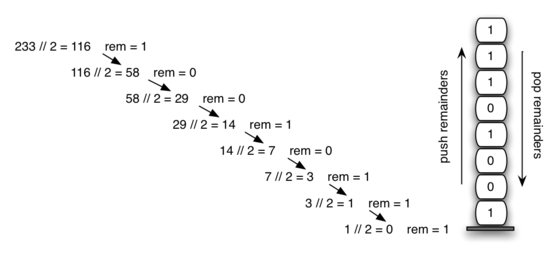
We again see the reversal property that signals that a stack is likely to be the appropriate data structure for solving the problem!
The C++ code below implements the Divide by 2 algorithm. The function divideBy2() takes an argument that is a decimal number and repeatedly divides it by 2:
#include <iostream>
#include <stack>
#include <string>
using namespace std;
string divideBy2(int decimalNum) {
    stack<int> remStack;
    while (decimalNum > 0) {
        remStack.push(decimalNum % 2);
        decimalNum = decimalNum / 2;}
    string binString = "";
    while (!remStack.empty()) {
        binString += to_string(remStack.top());
        remStack.pop();}
    return binString;
}
int main() {
    cout << divideBy2(42) << " " << divideBy2(31) << endl;
    return 0;
}
101010 11111
It can easily be extended to perform the conversion for any base. In computer science it is common to use a number of different encodings. The most common of these are binary, octal (base 8), and hexadecimal (base 16).
The decimal number $233_{10}$ and its corresponding octal and hexadecimal equivalents $351_{8}$ and $E9_{16}$ are interpreted as
$$3\times8^{2} + 5\times8^{1} + 1\times8^{0}$$
$$14\times16^{1} + 9\times16^{0}$$
The function divideBy2() can be modified to accept not only a decimal value but also a base for the intended conversion. The "Divide by 2" idea is simply replaced with a more general "Divide by base."
Base 2 through base 10 numbers need a maximum of 10 digits, so the typical digit characters 0 through 9 work fine.
The problem comes when we go beyond base 10. We can no longer simply use the remainders, as they are themselves represented as two-digit decimal numbers. Instead we need to create a set of digits that can be used to represent those remainders beyond 9
#include <iostream>
#include <stack>
using namespace std;

string baseConverter(int decimalNum, int base) {
    string digits = "0123456789ABCDEF";
    stack<int> remStack;
    while (decimalNum > 0) {
        remStack.push(decimalNum % base);  decimalNum /= base;
    }
    string newString = "";
    while (!remStack.empty()) {
        newString += digits[remStack.top()];  remStack.pop();
    }
    return newString;
}

int main() {
    cout << baseConverter(25, 2) << " " << baseConverter(25, 16) << endl;
    return 0;
}
11001 19
Expected: 11001 19 — the same value in binary and hexadecimal.
3.9. Infix, Prefix and Postfix Expressions
When you write an arithmetic expression such as B * C, the form of the expression provides you with information so that you can interpret it correctly.
In this case we know that the variable B is being multiplied by the variable C since the multiplication operator * appears between them in the expression. This type of notation is referred to as infix since the operator is in between the two operands that it is working on.
Consider another infix example, A + B * C. The operators + and * still appear between the operands, but there is a problem. Which operands do they work on?
Does the + work on A and B, or does the * take B and C? The expression seems ambiguous. In fact, we know something about the operators + and *. Each operator has a precedence level. Operators of higher precedence are used before operators of lower precedence.
The only thing that can change that order is the presence of parentheses. The precedence order for arithmetic operators places multiplication and division above addition and subtraction. If two operators of equal precedence appear, then a left-to-right ordering or associativity is used.
Let's interpret the troublesome expression A + B * C using operator precedence. B and C are multiplied first, and A is then added to that result. (A + B) * C would force the addition of A and B to be done first before the multiplication. In the expression A + B + C, by precedence (via associativity), the leftmost + would be done first.
Computers need to know exactly what operations to perform and in what order.
One way to write an expression that guarantees there will be no confusion with respect to the order of operations is to create what is called a fully parenthesized expression. This type of expression uses one pair of parentheses for each operator. The parentheses dictate the order of operations; there is no ambiguity!
The expression A + B * C + D can be rewritten as ((A + (B * C)) + D) to show that the multiplication happens first, followed by the leftmost addition. A + B + C + D can be written as (((A + B) + C) + D) since the addition operations associate from left to right.
There are two other very important expression formats that may not seem obvious to you at first. Consider the infix expression A + B. What would happen if we moved the operator before the two operands? The resulting expression would be + A B. Likewise, we could move the operator to the end, resulting in A B +. These look a bit strange.
These changes to the position of the operator with respect to the operands create two new expression formats, prefix and postfix. Prefix expression notation requires that all operators precede the two operands that they work on. Postfix, on the other hand, requires that its operators come after the corresponding operands.
A + B * C would be written as + A * B C in prefix. The multiplication operator comes immediately before the operands B and C, denoting that * has precedence over +. The addition operator then appears before the A and the result of the multiplication.
In postfix, the expression would be A B C * +. Again, the order of operations is preserved since the * appears immediately after the B and the C, denoting that * has precedence, with + coming after.
Now consider the infix expression (A + B) * C. Recall that in this case, infix requires the parentheses to force the performance of the addition before the multiplication.
However, when A + B was written in prefix, the addition operator was simply moved before the operands, + A B. The result of this operation becomes the first operand for the multiplication. The multiplication operator is moved in front of the entire expression, giving us * + A B C. Likewise, in postfix A B + forces the addition to happen first:
| Infix Expression | Prefix Expression | Postfix Expression |
|---|---|---|
A + B |
+ A B |
A B + |
A + B * C |
+ A * B C |
A B C * + |
(A + B) * C |
* + A B C |
A B + C * |
A + B * C + D |
+ + A * B C D |
A B C * + D + |
(A + B) * (C + D) |
* + A B + C D |
A B + C D + * |
A * B + C * D |
+ * A B * C D |
A B * C D * + |
A + B + C + D |
+ + + A B C D |
A B + C + D + |
3.9.1 Conversion of Infix Expressions to Prefix and Postfix
The first technique that we will consider uses the notion of a fully parenthesized expression that was discussed earlier.
Recall that A + B * C can be written as (A + (B * C)) to show explicitly that the multiplication has precedence over the addition. Look at the right parenthesis in the subexpression (B * C) above. If we were to move the multiplication symbol to that position and remove the matching left parenthesis, giving us B C *, we would in effect have converted the subexpression to postfix notation.
If the addition operator were also moved to its corresponding right parenthesis position and the matching left parenthesis were removed, the complete postfix expression would result:
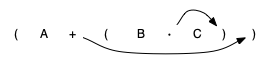
If we do the same thing but instead of moving the symbol to the position of the right, we move it to the left parenthesis, we get prefix notation. The position of the parenthesis pair is actually a clue to the final position of the enclosed operator.
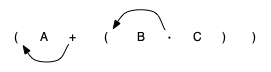
So in order to convert an expression, no matter how complex, to either prefix or postfix notation, fully parenthesize the expression using the order of operations. Then move the enclosed operator to the position of either the left or the right parenthesis depending on whether you want prefix or postfix notation:
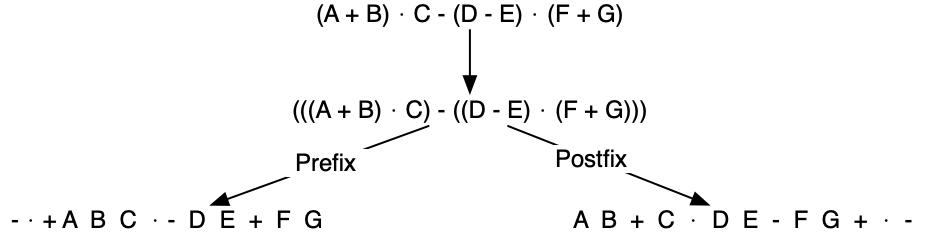
3.9.2. General Infix-to-Postfix Conversion
Consider once again the expression A + B * C. As shown above, A B C * + is the postfix equivalent. We have already noted that the operands A, B, and C stay in their relative positions. It is only the operators that change position.
Let's look again at the operators in the infix expression. The first operator that appears from left to right is +. However, in the postfix expression, + is at the end since the next operator, *, has precedence over addition. The order of the operators in the original expression is reversed in the resulting postfix expression.
As we process the expression, the operators have to be saved somewhere since their corresponding right operands are not seen yet. Also, the order of these saved operators may need to be reversed due to their precedence.
Because of this reversal of order, it makes sense to consider using a stack to keep the operators until they are needed! What about (A + B) * C? Recall that A B + C * is the postfix equivalent. Again, processing this infix expression from left to right, we see + first. In this case, when we see *, + has already been placed in the result expression because it has precedence over * by virtue of the parentheses.
The conversion algorithm works by saving a left parenthesis to indicate the upcoming arrival of a high-precedence operator, which waits for the corresponding right parenthesis to determine its position. When the right parenthesis appears, the operator is popped from the stack.
- Create
std::stack<string> opStackandvector<string> postfixList. - Tokenize the input with
std::istringstream.
- Scan the tokens from left to right:
- Append operands to
postfixList. - Push left parentheses onto
opStack. - For right parentheses, pop
opStackuntil the left parenthesis is removed, appending each operator topostfixList. - Push operators (
*,/,+,-) ontoopStackafter removing any higher or equal precedence operators from the stack and appending them topostfixList.
- Append operands to
- After processing the input expression, remove any remaining operators from
opStackand append them topostfixList.
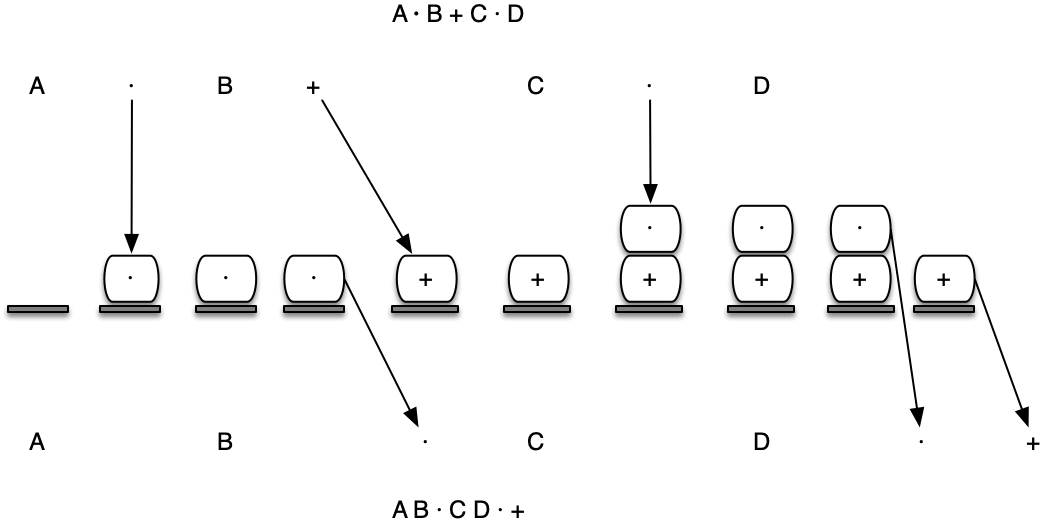
Tokens are extracted with std::istringstream; the complete C++ program is below.
#include <iostream>
#include "pythonds3/cppds/expression.hpp"   // full converter shown above
using namespace std;

int main() {
    cout << infixToPostfix("A * B + C * D") << endl;
    cout << infixToPostfix("( A + B ) * C - ( D - E ) * ( F + G )") << endl;
    return 0;
}
A B * C D * +
A B + C * D E - F G + * -
Expected:
A B * C D * +
A B + C * D E - F G + * -
3.9.3. Postfix Evaluation
We will now consider the evaluation of an expression that is already in postfix notation. In this case, a stack is again the data structure of choice. However, as you scan the postfix expression, it is the operands that must wait, not the operators as in the conversion algorithm above.
Another way to think about the solution is that whenever an operator is seen on the input, the two most recent operands will be used in the evaluation.
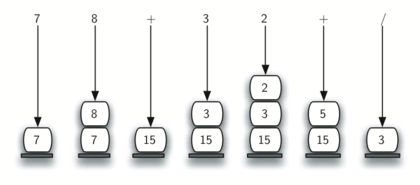
To see this in more detail, consider the postfix expression 4 5 6 * +. As you scan the expression from left to right, you first encounter the operands 4 and 5. At this point, you are still unsure what to do with them until you see the next symbol. Placing each on the stack ensures that they are available if an operator comes next.
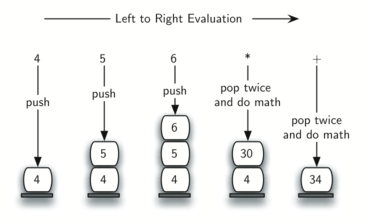
A slightly more complex example, 7 8 + 3 2 + /. First, the stack size grows, shrinks, and then grows again as the subexpressions are evaluated. Second, the division operation needs to be handled carefully. Recall that the operands in the postfix expression are in their original order since postfix changes only the placement of operators. When the operands for the division are popped from the stack, they are reversed. Since division is not a commutative operator, we must be sure that the order of the operands is not switched!
- Create
std::stack<double> operandStack. - Tokenize with
std::istringstreamand scan from left to right.
- Scan the tokens from left to right.
- If the token is an operand, convert it from a string to a number (
stod) and push the value ontooperandStack. - If the token is an operator,
*,/,+, or-, it will need two operands. PopoperandStacktwice. The first pop is the second operand and the second pop is the first operand. Perform the arithmetic operation. Push the result back onoperandStack.
- If the token is an operand, convert it from a string to a number (
- When the input expression has been completely processed, the result is on the stack. Return the top of
operandStack.
Evaluating one operator needs a small helper that applies it to two operands.
To assist with the arithmetic, a helper function doMath() is defined:
double doMath(string op, double op1, double op2) {
    if (op == "*") {
        return op1 * op2;
    } else if (op == "/") {
        return op1 / op2;
    } else if (op == "+") {
        return op1 + op2;
    } else {
        return op1 - op2;
    }
}
#include <iostream>
#include "pythonds3/cppds/expression.hpp"   // doMath + postfixEval
using namespace std;

int main() {
    cout << postfixEval("7 8 + 3 2 + /") << endl;
    return 0;
}
3
Expected: 3 — that is $(7+8)\,/\,(3+2)$.
It is important to note that in both the postfix conversion and the postfix evaluation programs we assumed that there were no errors in the input expression.
Exercise: Extend infixToPostfix() to convert 5 * 3 ^ (4 - 2).
#include <iostream>
#include <stack>
#include <vector>
#include <map>
#include <sstream>
#include <string>
#include <cctype>
using namespace std;

string infixToPostfix(string infixExpr) {
    // Your code here: add support for the right-associative ^ operator

    return result;
}

int main() {
    cout << infixToPostfix("5 * 3 ^ ( 4 - 2 )") << endl;
    return 0;
}
Hint: give ^ the highest precedence, and because it is right-associative, pop waiting operators only while their precedence is strictly greater than the incoming ^.
Expected: 5 3 4 2 - ^ *, which evaluates to 45.
3.10. What Is a Queue?
A queue is an ordered collection of items where the addition of new items happens at one end, called the rear, and the removal of existing items occurs at the other end, commonly called the front. As an element enters the queue it starts at the rear and makes its way toward the front, waiting until that time when it is the next element to be removed. The item that has been in the collection the longest is at the front. This ordering principle is sometimes called FIFO, first in, first out.
The simplest example of a queue is that we wait in a line for a movie, we wait in the checkout line at a grocery store, and we wait in the cafeteria line.
Well-behaved lines, or queues, are very restrictive in that they have only one way in and only one way out. There is no jumping in the middle and no leaving before you have waited the necessary amount of time to get to the front.
Computer science also has common examples of queues. Figure shows a simple queue of data objects.
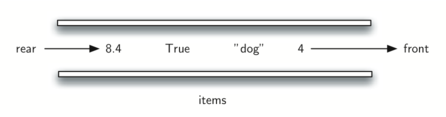
Operating systems use a number of different queues to control processes within a computer. The scheduling of what gets done next is typically based on a queuing algorithm that tries to execute programs as quickly as possible and serve as many users as it can.
3.11 The Queue Abstract Data Type
The queue operations are given below:
std::queue<T> q;constructs an empty queue.push(item)adds at the rear and returnsvoid.
front()andback()inspect the two ends.pop()removes the front and returnsvoid.empty()andsize()inspect the queue state.
Call front() before pop() when the removed value is needed. Calling front(), back(), or pop() on an empty queue violates the precondition.
The conceptual table lists front() on the left and back() on the right, matching the normal STL view.
std::queue<int> operation |
Conceptual contents (front at left) | Return value |
|---|---|---|
q.empty() |
[] |
true |
q.push(4) |
[4] |
void |
q.push(7) |
[4, 7] |
void |
q.front() |
[4, 7] |
4 |
q.back() |
[4, 7] |
7 |
q.pop() |
[7] |
void |
3.12 Using a Queue in C++
The cppds C++ text uses std::queue<T>. Enqueue with push, inspect with
front, then remove with pop (which returns void). back observes the
rear. All are $O(1)$ with the default deque backend.
#include <queue>

std::queue<std::string> q;
q.push("first");
q.push("second");
std::cout << q.front(); // first
q.pop();                // removes first; returns void
Course implementation supplement: pythonds3/cppds/queue.hpp uses
enqueue, value-returning dequeue, and isEmpty, which is more direct than the
STL's front() + pop() pair. The homework uses this course Queue<T>.
#include <iostream>
#include <queue>
#include <string>
using namespace std;

int main() {
    queue<string> q;
    q.push("4"); q.push("dog"); q.push("true");
    cout << q.size() << endl;
    cout << boolalpha << q.empty() << endl;
    cout << q.front() << endl;
    q.pop();
    cout << q.front() << endl;
}
3
false
4
dog
3.13. Simulation: Hot Potato
To begin, let's consider the children's game hot potato. In this game, children line up in a circle and pass an item from neighbor to neighbor as fast as they can. At a certain point in the game, the action is stopped and the child who has the item (the potato) is removed from the circle. Play continues until only one child is left.
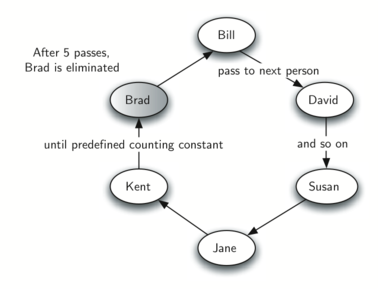
The simulation receives a vector<string> of names and a count. The active
circle is a std::queue<string>; it returns the last remaining name.
To simulate the circle, we will use a queue. Assume that the child holding the potato will be at the front of the queue. Upon passing the potato, the simulation will simply dequeue and then immediately enqueue that child, putting them at the end of the line.
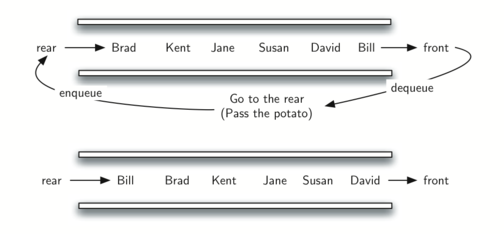
After num dequeue/enqueue operations, the child at the front will be removed permanently and another cycle will begin. This process will continue until only one name remains (the size of the queue is 1)!
#include <iostream>
#include <queue>
#include <vector>
using namespace std;

// STL queue: front() reads, pop() removes (returns nothing)
string hotPotato(vector<string> nameList, int num) {
    queue<string> simQueue;
    for (string name : nameList) simQueue.push(name);
    while (simQueue.size() > 1) {
        for (int i = 0; i < num; i++) {
            simQueue.push(simQueue.front());
            simQueue.pop();}
        simQueue.pop();}
    return simQueue.front();
}
int main() {
    cout << hotPotato({"Bill", "David", "Susan", "Jane", "Kent", "Brad"}, 7)
         << endl;
    return 0;
}
Susan
Expected: Susan survives the game.
Names are pushed in their given order, so the first name is initially at
front(). Moving one player means copying front(), pushing that value at
the rear, and then popping the old front.
Exercise: Implement the same simulation with the course Queue<T> API and document the API translation.
// Your code here
3.15 What Is a Deque?
A deque, also known as a double-ended queue, is an ordered collection of items similar to the queue. It has two ends, a front and a rear. What makes a deque different is the unrestrictive nature of adding and removing items.
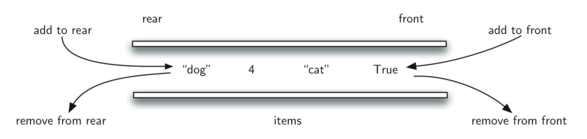
New items can be added at either the front or the rear. Likewise, existing items can be removed from either end. In a sense, this hybrid linear structure provides all the capabilities of stacks and queues in a single data structure.
3.16 The Deque Abstract Data Type
The deque operations are given below:
std::deque<T> d;constructs an empty deque.push_front(item)andpush_back(item)add at either end.
front()andback()inspect the ends.pop_front()andpop_back()remove and returnvoid.
empty()andsize()inspect state.
The course header pythonds3/cppds/deque.hpp instead provides a Deque<T> with addFront/addRear/removeFront/removeRear/isEmpty.
For std::deque, front() is shown on the left and back() on the right.
std::deque<int> operation |
Contents (front at left) | Return value |
|---|---|---|
d.empty() |
[] |
true |
d.push_back(4) |
[4] |
void |
d.push_front(7) |
[7, 4] |
void |
d.front() |
[7, 4] |
7 |
d.back() |
[7, 4] |
4 |
d.pop_front() |
[4] |
void |
3.17 Using a Deque in C++
The C++ Standard Library std::deque<T> supports constant-time insertion and
removal at both ends with push_front, push_back, pop_front, and
pop_back.
#include <deque>

std::deque<int> d;
d.push_front(2);
d.push_back(7);
int first = d.front();
d.pop_front();
int last = d.back();
d.pop_back();
Course implementation supplement. pythonds3/cppds/deque.hpp uses
addFront, addRear, and value-returning removeFront/removeRear. Its
chosen vector representation makes the operations at one end $O(n)$; this is
not the complexity of std::deque.
Use std::deque as the normal C++ implementation. Use the course Deque<T>
only where an exercise explicitly asks you to study its representation and
operation costs.
3.18 Palindrome-Checker
A palindrome is a string that reads the same forward and backward, for example, radar, toot, and madam. We would like to construct an algorithm to input a string of characters and check whether it is a palindrome.
The solution to this problem will use a deque to store the characters of the string. We will process the string from left to right and add each character to the rear of the deque. At this point, the deque will be acting very much like an ordinary queue.
However, we can now make use of the dual functionality of the deque. The front of the deque will hold the first character of the string and the rear of the deque will hold the last character.
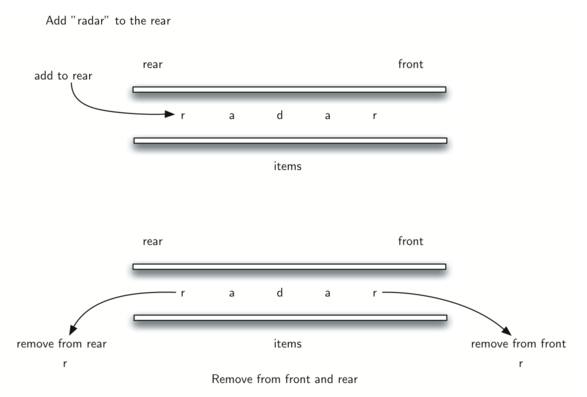
Since we can remove both of the front and rear characters directly, we can compare them and continue only if they match. If we can keep matching first and the last items, we will eventually either run out of characters or be left with a deque of size 1 depending on whether the length of the original string was even or odd. In either case, the string must be a palindrome.
#include <iostream>
#include <deque>
#include <string>
using namespace std;

bool palChecker(string aString) {
    deque<char> charDeque;
    for (char ch : aString) charDeque.push_back(ch);   // add to the rear
    while (charDeque.size() > 1) {
        char first = charDeque.front(); charDeque.pop_front();
        char last = charDeque.back(); charDeque.pop_back();
        if (first != last) return false;
    }
    return true;
}

int main() {
    cout << boolalpha;
    cout << palChecker("lsdkjfskf") << endl;   // false
    cout << palChecker("radar") << endl;       // true
    return 0;
}
false
true
References
- Textbook: Problem Solving with Algorithms and Data Structures using C++ (cppds), Chapter 3 (Linear Structures) — https://runestone.academy/ns/books/published/cppds/index.html